 LotsAgent
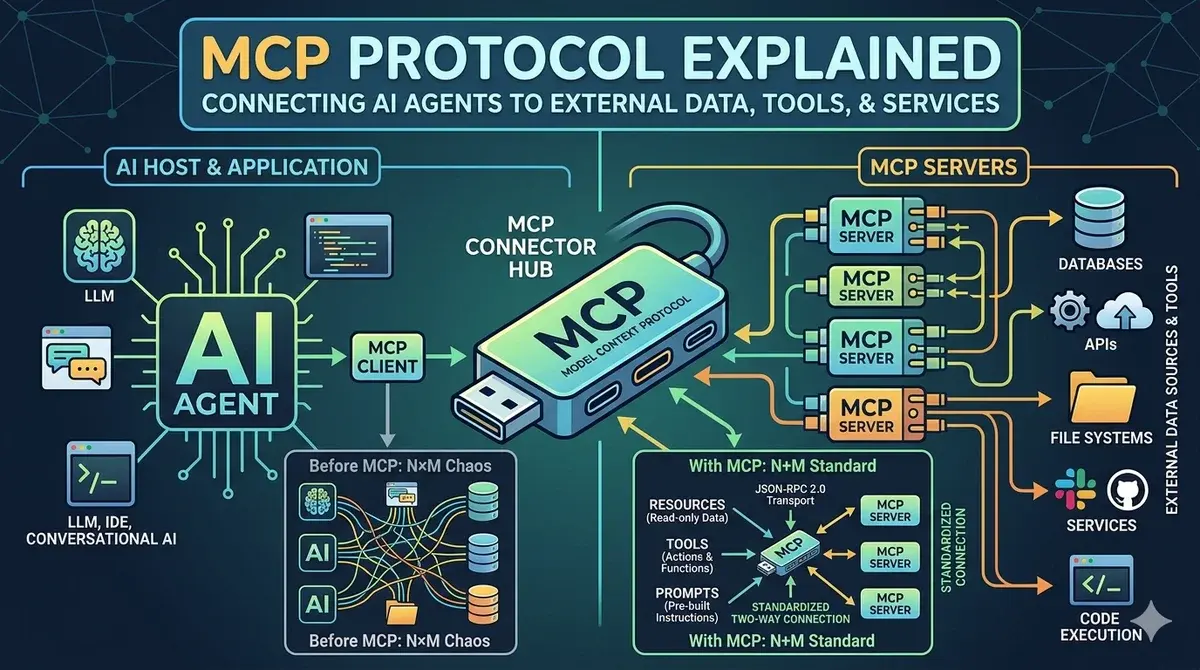
MCP (Model Context Protocol) is an open standard for connecting AI apps and agents to the tools and data they need. Instead of writing a custom connector for every app and every AI client, you expose your tools once as an MCP server, and any MCP client (Claude, ChatGPT, VS Code, Cursor and many more) can use them. The project's own analogy is a USB-C port for AI: one plug, many devices.
I'm Sivaguru, founder of LotsTech. I build LotsAgent, which both uses MCP tools and can be managed through its own MCP server, so MCP is something I work with every day rather than read about. This is the refreshed version of my explainer, with the facts checked on modelcontextprotocol.io on 26 November 2026.
What MCP is, in plain words
Before MCP, every AI app that wanted to read your files, search your docs or create a ticket needed its own integration with each service. Ten AI apps and ten services meant up to a hundred bespoke connectors, each one maintained separately.
MCP turns that into a shared contract. A service describes what it offers in a standard way, and any AI app that speaks MCP can discover and use it.
The specification names three roles:
- Host: the AI application the person uses, such as a chat app or an IDE.
- Client: the connector inside the host that talks to one server.
- Server: the service that exposes capabilities, such as your CRM, your docs or your own product.
Messages are JSON-RPC 2.0. A server can offer three kinds of things:
- Tools: functions the model can run, such as "create invoice" or "search tickets".
- Resources: context and data for the person or the model to use.
- Prompts: templated messages and workflows the person can pick.
A client can offer things back to the server too, such as elicitation, where the server asks the person for a missing piece of information mid-task.
What changed in 2026
If you learned MCP in 2025, three things are worth knowing (checked 26 November 2026):
1. The current spec is the 2026-07-28 revision. The latest specification describes the base protocol as stateless, self-contained requests with capability negotiation on each request. The project's roadmap says this release "made a remote MCP server a normal HTTP workload". In practice that's the fix for the old pain of long-lived sessions tied to one server instance behind a load balancer.
2. Optional extensions. Beyond the core, the spec lists opt-in extensions that both sides must support. The notable ones today: Tasks (long-running work you can poll, give more input to mid-flight and come back to later), Skills over MCP (structured instructions for agent workflows) and MCP Apps (interactive UI such as charts and forms shown inside the conversation).
3. A published roadmap. The MCP roadmap, last updated 22 August 2026, sets five priority areas for the next release:
- Agentic messaging primitives: server-initiated events and push delivery, so a client doesn't have to keep polling to learn that work finished, and making Tasks, subscriptions and progress compose cleanly.
- HTTP-native transport unification and hardening: one transport model (Streamable HTTP, also spoken over stdio for local servers) and better caching.
- Agent identity and enterprise-ready security: today MCP authorization assumes a person with a browser at consent time; the maintainers want a standard way for servers to handle agents acting for someone who isn't present.
- Improved primitives.
- Improved SDK developer experience.
The roadmap says plainly that it reflects current thinking, not firm commitments. Treat it as direction, not dates.
There is also an official MCP Registry where servers can be published so clients can find them. On governance: the A2A project's August 2026 announcement lists MCP as a sibling project under the Linux Foundation's Agentic AI Foundation.
Who supports MCP
The MCP site lists AI assistants like Claude and ChatGPT and development tools like Visual Studio Code, Cursor and MCPJam among the clients that support it. I'm sticking to what the project's own page says here; vendor support changes fast, so check the client you care about before you build around it.
MCP and security: the part people skip
MCP makes it easy to give an AI real power, and that's exactly why security can't be an afterthought. The spec is direct about it: tools represent arbitrary code execution, tool descriptions from an untrusted server should be treated as untrusted, and hosts must get the person's explicit consent before invoking a tool. MCP can't enforce that at the protocol level. The app has to.
If you build or connect MCP servers, here's the checklist I use:
- Least privilege. Expose the tools the agent needs, not your whole API. Read tools and write tools are different risks.
- Act as the person, not as an admin. The agent should call your server with the signed-in person's own access, so your normal permission checks run.
- A human confirms consequential actions. Sending, deleting and moving money should never happen silently.
- Treat content as data. Text inside an email, a web page or a document can contain instructions. Your agent should read it as information, never as orders.
- Log every tool call. When something goes wrong you need to know what was called, by whom and when.
- Validate inputs on the server. Don't trust the model to send well-formed parameters. Check them like you would any public API input.
How LotsAgent uses MCP
MCP shows up in LotsAgent in three places.
1. Your agent uses tools through MCP. On an agent's Tools tab you connect apps like Notion, Slack and Google Drive, or your own app through MCP, then choose which actions the agent may use. For an in-app agent, you connect it to your product's MCP server and every call carries the signed-in person's own access, so your app's permission checks run: a viewer can only view, an admin can do admin work. Anything that sends, deletes or moves money shows a Confirm card first, with names instead of ids.
2. Your agent is an MCP server. On Deploy, under API and MCP, you can turn on MCP connections for the agent (off by default) and add its address to a client like Claude, ChatGPT or Cursor. Runs from MCP have nobody to press Confirm, so actions that need Confirm don't run there.
3. You manage LotsAgent itself from an AI app. Add https://api.lotsagent.com/mcp to an AI app that supports MCP connectors. It asks you to sign in and to choose what it may do: read, change, publish and delete are separate switches. From there you can create agents, change their instructions, add knowledge from a website, check knowledge gaps and put an agent live, all from a chat. LotsAgent is listed in the official MCP Registry as com.lotsagent/lotsagent.
If you're turning your own product into something an agent can call, I wrote a longer guide on making business tools agent-callable with MCP.
MCP vs A2A, briefly
MCP connects an agent to tools. A2A connects agents to other agents that reason on their own. They're complementary: an agent might use MCP to read your CRM and A2A to hand a whole task to a specialist agent another team runs. My A2A explainer covers the second half.
FAQ
What is MCP in simple terms?
MCP (Model Context Protocol) is an open standard that lets AI apps and agents connect to tools and data in one consistent way. A service exposes its tools once as an MCP server, and any MCP client can discover and use them.
What is the latest MCP specification version?
On 26 November 2026, the latest specification on modelcontextprotocol.io is the 2026-07-28 revision. It describes stateless, self-contained requests and makes a remote MCP server a normal HTTP workload.
Is MCP secure?
MCP itself can't enforce security. The specification says hosts must get explicit consent before invoking tools and should treat tool descriptions from untrusted servers as untrusted. Safety depends on how the app and server are built: least privilege, acting as the signed-in person, confirmation for risky actions and logging.
What is the difference between MCP and an API?
An API is specific to one service. MCP is a common way for AI apps to discover and call tools across many services. Many MCP servers are a layer over an existing API.
Can LotsAgent connect to my own MCP server?
Yes. On the agent's Tools tab you can connect your own app through MCP and choose which actions the agent may use. Every call can carry the signed-in person's own access, and anything that sends, deletes or moves money waits for the person to press Confirm.
Put MCP to work
If you want an agent that uses your tools through MCP and checks with the person before anything important, try LotsAgent with a 14-day trial, no card needed. The docs show how to connect tools and deploy.
Updated 26 November 2026.